Long Time No Graphics
We’re back from a little bit of a hiatus! Been busy with a few personal things, but still have been getting a little bit of work done in the background. Per usual, the graphics have slowed me down a little bit even without pursuing production quality, but I’m going to persevere, so let’s move on!
Generic Theme
So as we move from hello world to actual game play, we’re not going to spend too much time to start on the game theme. This is critical for where we want to go with this, but I wanted to get a little bit more framework experience under our belts before we start story telling, so we’ll start with pretty common theme of a simple platformer with a jumping guy in a single screen world with some enemy interactions.
World Building
To begin with, we need a world to move around in right? So you might try something from https://www.nesdev.org/wiki/Tools#General_NES_graphics_studios, but when I looked, it felt like most of the tools were built around editing NES assets. That does make sense of course, but a lot of that to me has more to do with the packaging (to be fair, I didn’t bother trying some of the tools that were MS Windows based) than development. I saw that Aesprite supports tilemap layers and it seemed good enough to prototype and generate required tile assets, but even that is just the beginning. Aesprite does a good job of interpreting draw assets as individual tiles that are available for export. It’s also a pretty good way to prototype the world. Aesprite supports scripting, so with some work it might also be possible to add more export capability.
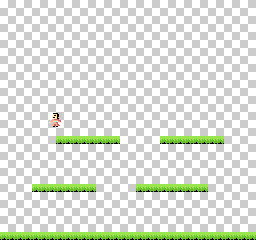
Aesprite image with tilemap
Even if we are able to convert Aesprite world tiles into required NES format, that isn’t what we’d want to do. We’d run out of tile space quickly from all of the repetition (maybe the tools other tools support world export by index). So I threw together a quick python based world creator to build the world based on the tilemap imported from Aesprite. I’ll share the tool once it becomes a little more mature.
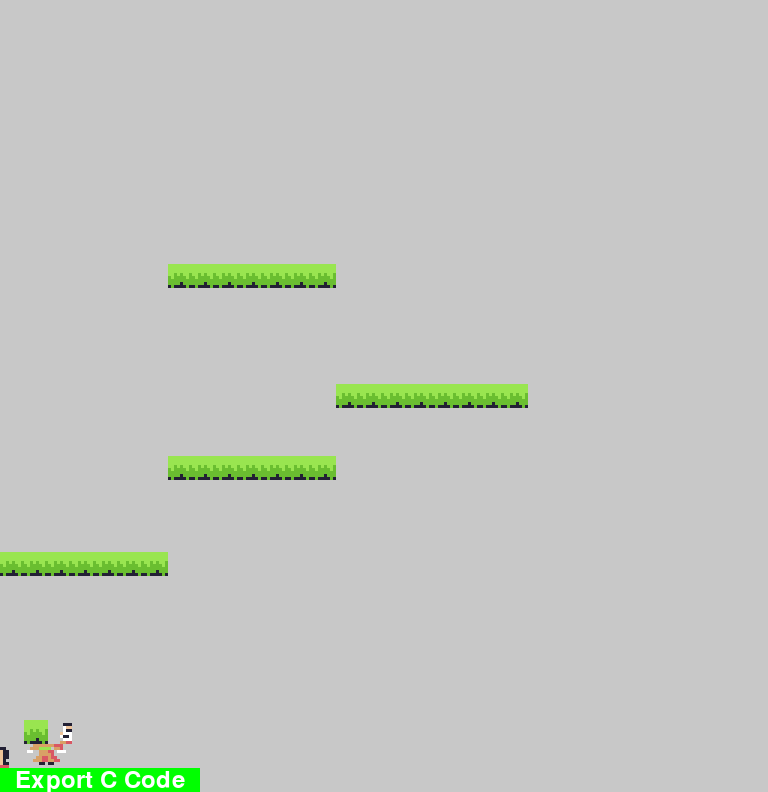
Word Editor
World Format
I can’t recall what pursuit took me to the knowledge of Mario level encoding, but after watching something of a documentary on the development behind Micro Mages , I began to appreciate that by default (original cartridge mapper), the NES was very limited on memory. With a single screen of being 256×240 or 32×30 tiles (8×8), if a byte was used to represent each tile in the world, we’d be sitting at 960 byte per screen. You’re not going to have many screens in your world if you take that approach. The original Super Mario Brothers used run-length encoding (RLE) to be able to compress their words into the ~40kB space.
We’re going to punt on hard formatting choices for the moment, primarily because I’m not sure what’s optimal for being able to query world interactions like boundary box hit detection during gameplay. For now, we’re going to limit our world’s to a single screen and use a whole byte to represent the index of the tile to be rendered for the world. With the export feature on the world builder, we’re able to import the world into our source code.
char level_data[30][32] = {
{0, 0, 0, 0, 0, 0, 0, 0, 0, 0, 0, 0, 0, 0, 0, 0, 0, 0, 0, 0, 0, 0, 0, 0, 0, 0, 0, 0, 0, 0, 0, 0},
{0, 0, 0, 0, 0, 0, 0, 0, 0, 0, 0, 0, 0, 0, 0, 0, 0, 0, 0, 0, 0, 0, 0, 0, 0, 0, 0, 0, 0, 0, 0, 0},
{0, 0, 0, 0, 0, 0, 0, 0, 0, 0, 0, 0, 0, 0, 0, 0, 0, 0, 0, 0, 0, 0, 0, 0, 0, 0, 0, 0, 0, 0, 0, 0},
{0, 0, 0, 0, 0, 0, 0, 0, 0, 0, 0, 0, 0, 0, 0, 0, 0, 0, 0, 0, 0, 0, 0, 0, 0, 0, 0, 0, 0, 0, 0, 0},
{0, 0, 0, 0, 0, 0, 0, 0, 0, 0, 0, 0, 0, 0, 0, 0, 0, 0, 0, 0, 0, 0, 0, 0, 0, 0, 0, 0, 0, 0, 0, 0},
{0, 0, 0, 0, 0, 0, 0, 0, 0, 0, 0, 0, 0, 0, 0, 0, 0, 0, 0, 0, 0, 0, 0, 0, 0, 0, 0, 0, 0, 0, 0, 0},
{0, 0, 0, 0, 0, 0, 0, 0, 0, 0, 0, 0, 0, 0, 0, 0, 0, 0, 0, 0, 0, 0, 0, 0, 0, 0, 0, 0, 0, 0, 0, 0},
{0, 0, 0, 0, 0, 0, 0, 0, 0, 0, 0, 0, 0, 0, 0, 0, 0, 0, 0, 0, 0, 0, 0, 0, 0, 0, 0, 0, 0, 0, 0, 0},
{0, 0, 0, 0, 0, 0, 0, 0, 0, 0, 0, 0, 0, 0, 0, 0, 0, 0, 0, 0, 0, 0, 0, 0, 0, 0, 0, 0, 0, 0, 0, 0},
{0, 0, 0, 0, 0, 0, 0, 0, 0, 0, 0, 0, 0, 0, 0, 0, 0, 0, 0, 0, 0, 0, 0, 0, 0, 0, 0, 0, 0, 0, 0, 0},
{0, 0, 0, 0, 0, 0, 0, 0, 0, 0, 0, 0, 0, 0, 0, 0, 0, 0, 0, 0, 0, 0, 0, 0, 0, 0, 0, 0, 0, 0, 0, 0},
{0, 0, 0, 0, 0, 0, 0, 1, 1, 1, 1, 1, 1, 1, 0, 0, 0, 0, 0, 0, 0, 0, 0, 0, 0, 0, 0, 0, 0, 0, 0, 0},
{0, 0, 0, 0, 0, 0, 0, 0, 0, 0, 0, 0, 0, 0, 0, 0, 0, 0, 0, 0, 0, 0, 0, 0, 0, 0, 0, 0, 0, 0, 0, 0},
{0, 0, 0, 0, 0, 0, 0, 0, 0, 0, 0, 0, 0, 0, 0, 0, 0, 0, 0, 0, 0, 0, 0, 0, 0, 0, 0, 0, 0, 0, 0, 0},
{0, 0, 0, 0, 0, 0, 0, 0, 0, 0, 0, 0, 0, 0, 0, 0, 0, 0, 0, 0, 0, 0, 0, 0, 0, 0, 0, 0, 0, 0, 0, 0},
{0, 0, 0, 0, 0, 0, 0, 0, 0, 0, 0, 0, 0, 0, 0, 0, 0, 0, 0, 0, 0, 0, 0, 0, 0, 0, 0, 0, 0, 0, 0, 0},
{0, 0, 0, 0, 0, 0, 0, 0, 0, 0, 0, 0, 0, 0, 1, 1, 1, 1, 1, 1, 1, 1, 0, 0, 0, 0, 0, 0, 0, 0, 0, 0},
{0, 0, 0, 0, 0, 0, 0, 0, 0, 0, 0, 0, 0, 0, 0, 0, 0, 0, 0, 0, 0, 0, 0, 0, 0, 0, 0, 0, 0, 0, 0, 0},
{0, 0, 0, 0, 0, 0, 0, 0, 0, 0, 0, 0, 0, 0, 0, 0, 0, 0, 0, 0, 0, 0, 0, 0, 0, 0, 0, 0, 0, 0, 0, 0},
{0, 0, 0, 0, 0, 0, 0, 1, 1, 1, 1, 1, 1, 1, 0, 0, 0, 0, 0, 0, 0, 0, 0, 0, 0, 0, 0, 0, 0, 0, 0, 0},
{0, 0, 0, 0, 0, 0, 0, 0, 0, 0, 0, 0, 0, 0, 0, 0, 0, 0, 0, 0, 0, 0, 0, 0, 0, 0, 0, 0, 0, 0, 0, 0},
{0, 0, 0, 0, 0, 0, 0, 0, 0, 0, 0, 0, 0, 0, 0, 0, 0, 0, 0, 0, 0, 0, 0, 0, 0, 0, 0, 0, 0, 0, 0, 0},
{0, 0, 0, 0, 0, 0, 0, 0, 0, 0, 0, 0, 0, 0, 0, 0, 0, 0, 0, 0, 0, 0, 0, 0, 0, 0, 0, 0, 0, 0, 0, 0},
{1, 1, 1, 1, 1, 1, 1, 0, 0, 0, 0, 0, 0, 0, 0, 0, 0, 0, 0, 0, 0, 0, 0, 0, 0, 0, 0, 0, 0, 0, 0, 0},
{0, 0, 0, 0, 0, 0, 0, 0, 0, 0, 0, 0, 0, 0, 0, 0, 0, 0, 0, 0, 0, 0, 0, 0, 0, 0, 0, 0, 0, 0, 0, 0},
{0, 0, 0, 0, 0, 0, 0, 0, 0, 0, 0, 0, 0, 0, 0, 0, 0, 0, 0, 0, 0, 0, 0, 0, 0, 0, 0, 0, 0, 0, 0, 0},
{0, 0, 0, 0, 0, 0, 0, 0, 0, 0, 0, 0, 0, 0, 0, 0, 0, 0, 0, 0, 0, 0, 0, 0, 0, 0, 0, 0, 0, 0, 0, 0},
{0, 0, 0, 0, 0, 0, 0, 0, 0, 0, 0, 0, 0, 0, 0, 0, 0, 0, 0, 0, 0, 0, 0, 0, 0, 0, 0, 0, 0, 0, 0, 0},
{0, 0, 0, 0, 0, 0, 0, 0, 0, 0, 0, 0, 0, 0, 0, 0, 0, 0, 0, 0, 0, 0, 0, 0, 0, 0, 0, 0, 0, 0, 0, 0},
{0, 0, 0, 0, 0, 0, 0, 0, 0, 0, 0, 0, 0, 0, 0, 0, 0, 0, 0, 0, 0, 0, 0, 0, 0, 0, 0, 0, 0, 0, 0, 0},
};
Background writes can’t be performed directly to PPU memory, it requires access through DMA or register manipulation. The mos-sdk provides some nice functions to manipulate the background before and after rendering is enabled, but be aware, there are limits to the amount of data that is transferrable during the safe vblank periods of time. That’s probably why games would often have black backgrounds during boss fights, because they couldn’t use the background for large sprite boss animations and maintain anything in the background. At least initially, we aren’t concerned with in game background changes so we’ll just pre-render our world background.
void preload_screen()
{
int name_adr=NAMETABLE_A;
int attr_adr=NAMETABLE_A+960;
update_list[0]=MSB(name_adr)|NT_UPD_HORZ;//set nametable update address
update_list[1]=LSB(name_adr);
update_list[2]=32;//length of nametable update sequence
update_list[35]=MSB(attr_adr)|NT_UPD_HORZ;//set attribute table update address
update_list[36]=LSB(attr_adr);
update_list[37]=8;//length of attribute update sequence
update_list[46]=NT_UPD_EOF;
for(int i = 0; i < 30; i++)
{
for(int j = 0; j < 32; j++) {
update_list[updn_off+j] = level_data[i][j];
}
name_adr = NAMETABLE_A+(i<<5);
update_list[0]=MSB(name_adr)|NT_UPD_HORZ;//set nametable update address
update_list[1]=LSB(name_adr);
flush_vram_update(update_list);
}
}
What’s Missing
Aside from those things already mentioned, we’ve also left gaps in how background colors are loaded from our graphics assets. Remember the there are a limited number of color palettes available to tile at any point in time. Yet another constraint to consider during design, this isn’t something tackled as yet.
Up Next
Next we’ll start getting into the game physics and animation